What it is
NSB is a PvP sandbox MMORPG we are building, a spiritual successor to Shadowbane from twenty years ago: players build their own cities, go to war and fight over territory. The client is Unreal Engine 5.8 (C++), the server is an authoritative server written in C# / .NET 10, and the world is assembled from individual "shard" maps.
The project's first commit is dated 2026-10-28 02:37. By November 1 there were 117 commits: documents, data tables, server, client and maps, all done by AI agents.
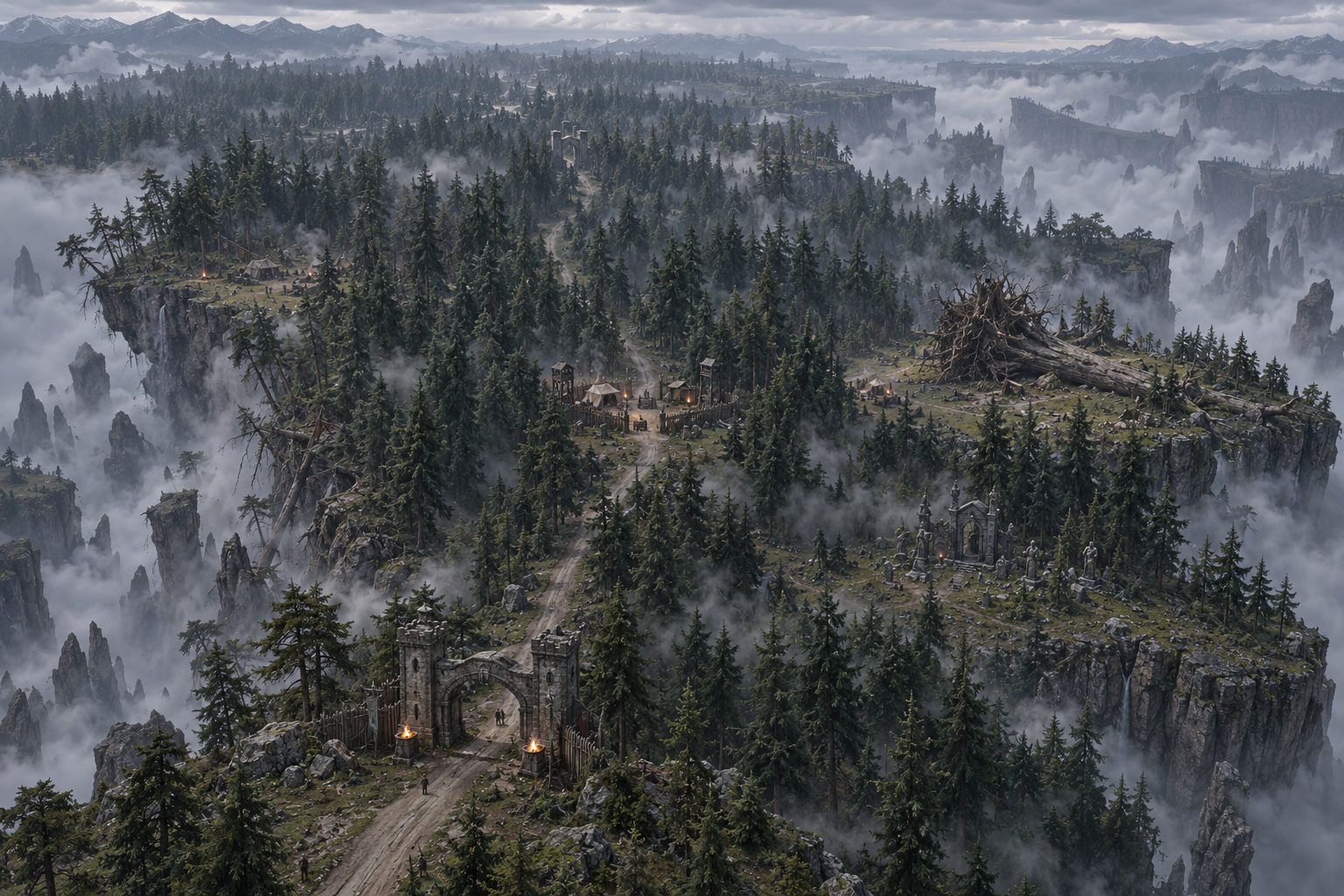
This post covers just one part of that: the problems we hit building a map with AI, and how we solved them. The example is the first full map, Northwood: a primeval forest of about 5 × 4 km growing on cliff-edged plateaus, with fog valleys between them whose floor you cannot see.
One person and an AI team
For the first few days a single AI agent (Claude Code) handled everything. In the last day or two the workload outgrew one context, so we switched to multi-agent collaboration in Cindy, with a division of labor like a small studio:
| Role | Played by | What it does |
|---|---|---|
| Lead | Claude | Breaks down tasks, hands them out, accepts the work and sums up; writes no code itself |
| Programmer | Claude Code | Writes tools, edits layouts, rebuilds levels, runs the checks |
| Art director | Codex | Goes into the editor to look at the picture, compares it item by item with the concept art, writes review reports and rework lists |
| Assistant | Another model | Looks things up, reads commit history, organizes facts |
How does an AI "get into the editor"? UE 5.8 ships with an MCP server. Through it an agent can query and place things in the level, import models, change materials, and move the camera to take screenshots, without anyone clicking the mouse for it.
The workflow: four steps, stopping after each to show a person
Northwood was first put together by feel. By the evening of day one there was a floating island you could join over the network, with the camp, monsters and gates all in place. But playtesting immediately exposed a pile of problems: the fence had gaps on all four sides, objects clipped into each other, and the main road was too long to run in one go. All of this should have been caught at the "measuring" stage.
So late on the first night we settled on a four-step process (project decision D062), and every map since has followed it:
| Step | What happens | Output |
|---|---|---|
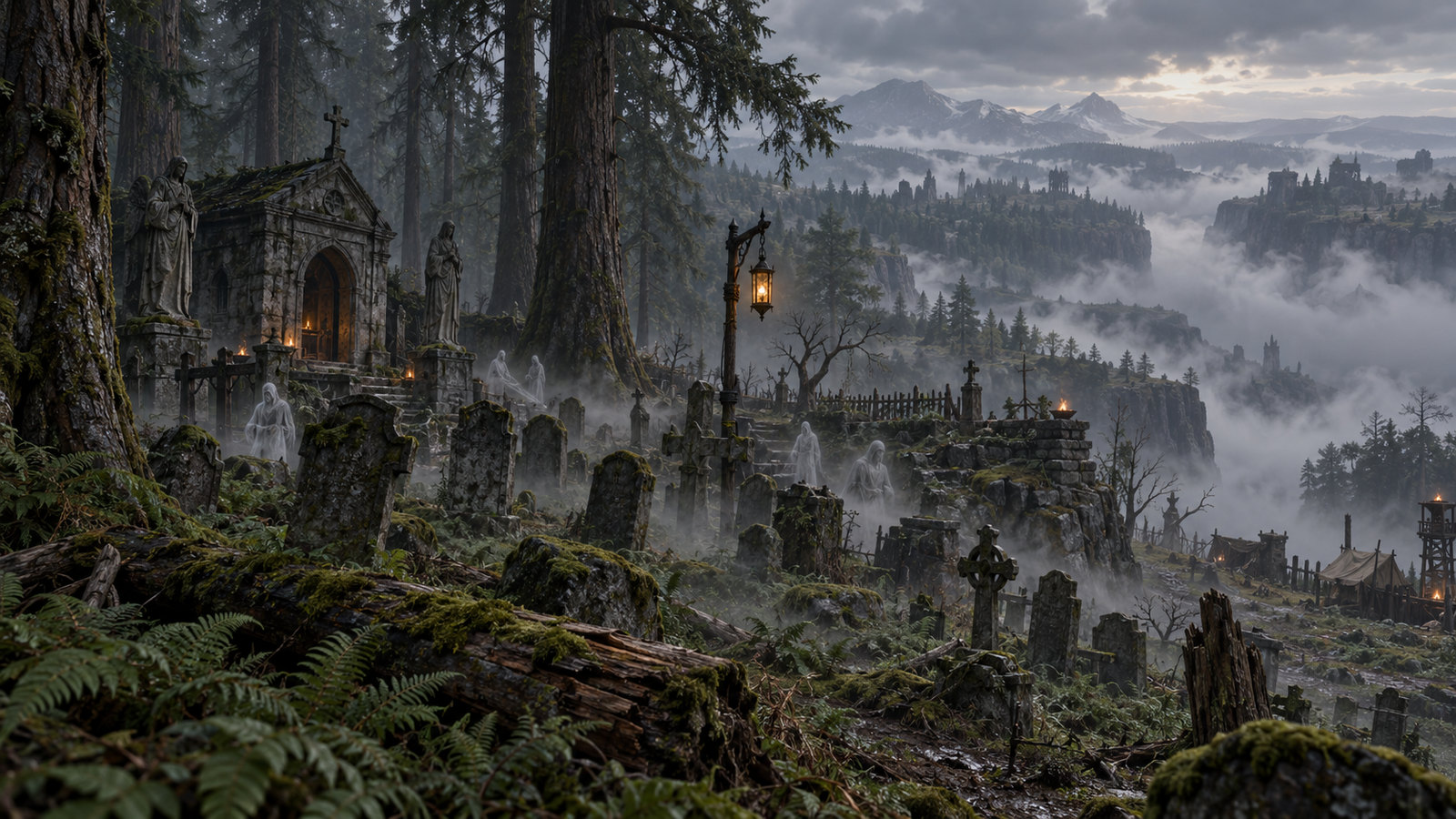
| 1 Concept art | Write a brief card and generate 3 to 5 concept images from text only; list the light sources and mark which asset each thing is meant to use | Brief card, concept art, prompt log |
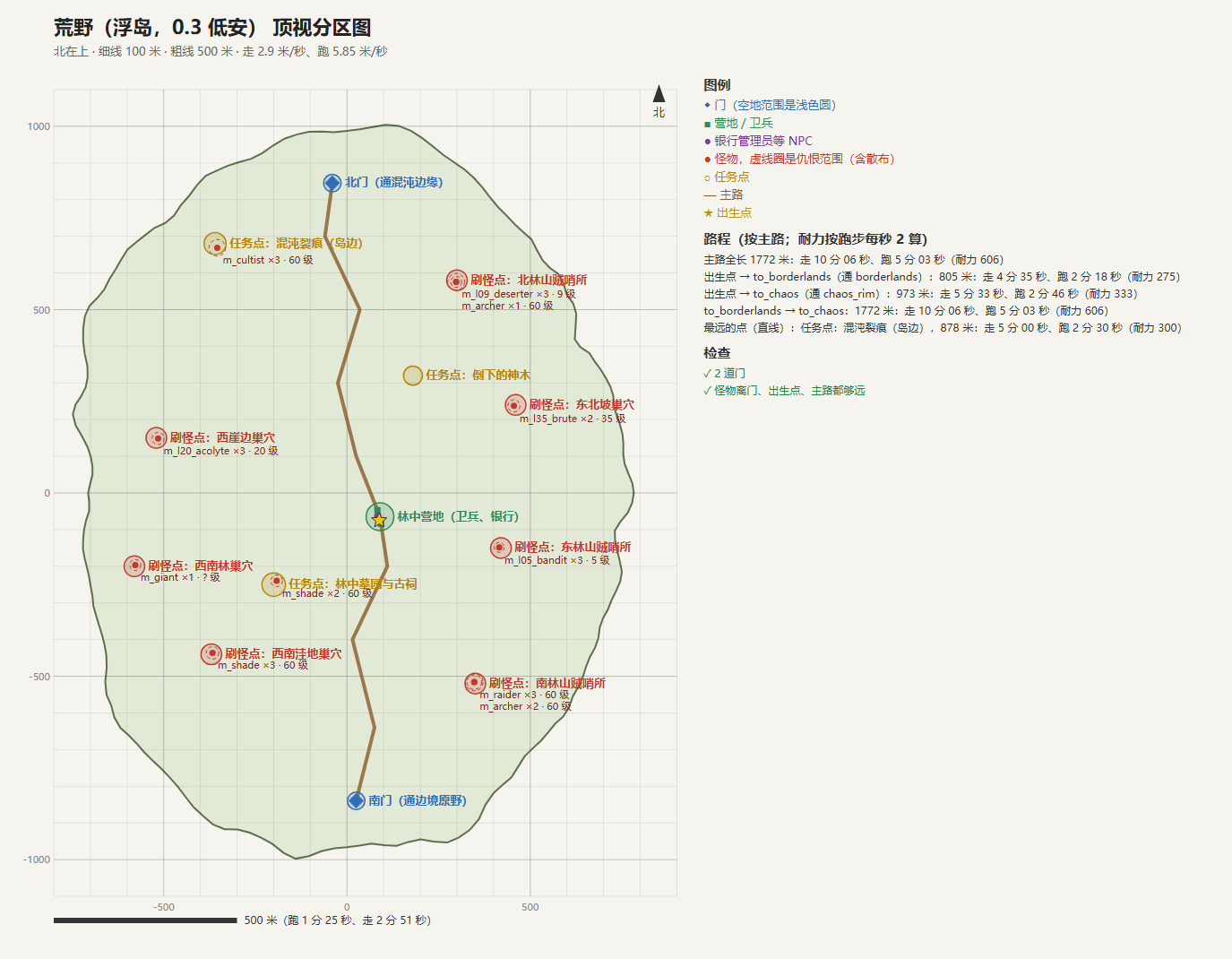
| 2 Top-down zoning map | Write the layout file; a script draws a zoning map with "north up, 100 m per square", works out how long a run takes and how much stamina it costs, and checks whether monster aggro ranges reach the main road and the gates | 02_layout.json, zoning map |
| 3 Scale sheet | Measure each model's real size, pivot and collision in the editor, and screenshot them lined up with a dwarf, a human and a half-giant | Size table, issue list, scale sheet |
| 4 Generation | Read only the earlier files, then build the level, scatter trees, place props, export the navigation grid, write the server's map data and take acceptance screenshots | Level, navigation grid, map data, comparison images |
Each step is confirmed before the next one starts. When playtesting turns up a problem, we first decide which step it belongs to: mood and light go back to step 1, distances and monster placement to step 2, sizes, clipping and collision to step 3.
One iron rule: nothing gets moved by hand in the editor
Step 4 is done by a map toolkit with a single entry point:
python run.py wilds terrain    # Generate terrain and tree and ground cover scatter points offline
python run.py wilds level      # Build the level and import the terrain
python run.py wilds scatter    # Scatter giant trees and ground plants with PCG
python run.py wilds dress      # Props for the camp, cemetery and monster spawns
python run.py wilds nav        # Export the navigation grid
python run.py wilds mapdata    # Write the server's map data
python run.py wilds verify     # Automatic acceptance checks
Everything in the level is generated from three things: the layout (02_layout.json), the asset list (03_assets.json) and the toolkit code. When something looks wrong, the AI changes one of these three and reruns the matching step. It does not drag things around by hand in the editor. The benefit of this rule is repeatability: delete the level and rebuild it at any time and you get the same map. After a toolkit change we use Northwood as a regression test: terrain and scatter points must match the previous version byte for byte, and the position difference of the 328 placed objects must be 0.
These steps were later also written up as a skill (an operating manual). A freshly started agent reads it once and knows how to make a map, with nothing to explain from scratch.
Acceptance does not rely on "looks fine"
AI is very good at saying "done". So every step comes with checks that run automatically:
- Ground check: at 300 random points, compare the ground an editor ray hits with the ground the generator computed. The error must be within ±10 cm.
- Reachability check: starting from the camp, every point of interest and monster spawn must be reachable on foot.
- Data validation: the server's map data goes through validation with 0 errors.
- Hole scan: compare the navigation grid with the terrain cell by cell, looking for anywhere you could fall through (more on why this was added later).
- Bots: restart the server, release 3 bots and have them walk every gate on the map there and back.
- Concept comparison: shoot the same angle in the game from the concept art's camera position and put the two side by side.
The last one matters most. As early as day two we wrote in the log: passing the traversal checks does not mean passing the visual match.
How the forest grew
October 28: the floating island sample. We started with a floating island of about 1.2 × 0.9 km: 2751 silver firs, over 70,000 ferns, mosses and fallen logs, and 84 broken cliffs around the edge. That evening it grew to about 2 × 1.5 km and was connected to the networked game as "the Wilds"; bots walked both gates there and back, 3 out of 3.
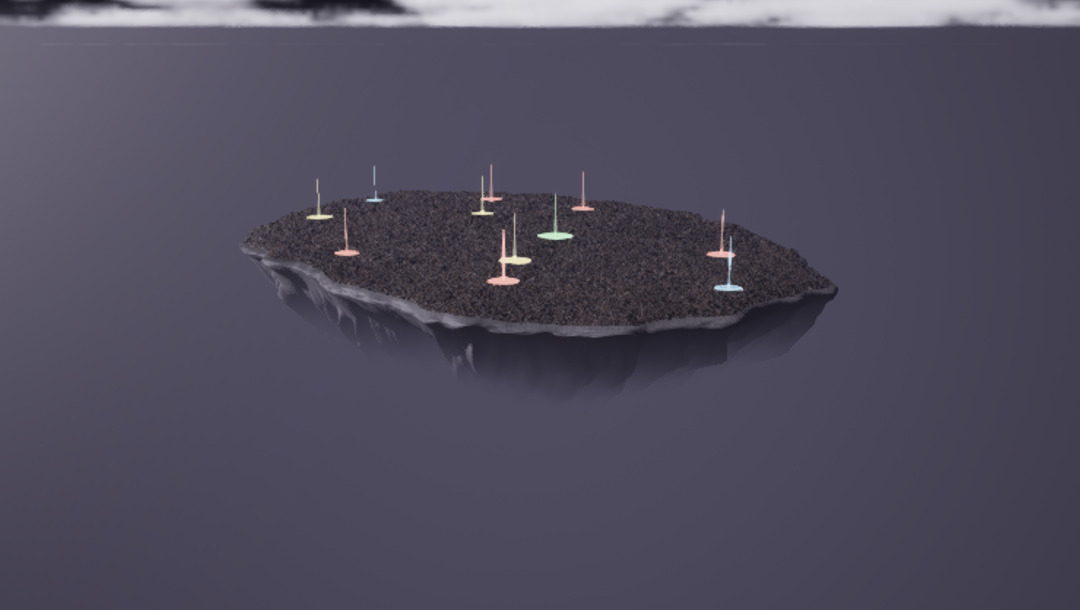
October 29: from floating island to mainland. While drawing the atlas of the whole world we realized the floating island did not fit the setting: the world is a shattered continent, joined up at the center and only split apart around the edges, not sky islands shaped like inverted cones everywhere. Northwood was rebuilt to match as a continental forest of about 5 × 4 km.
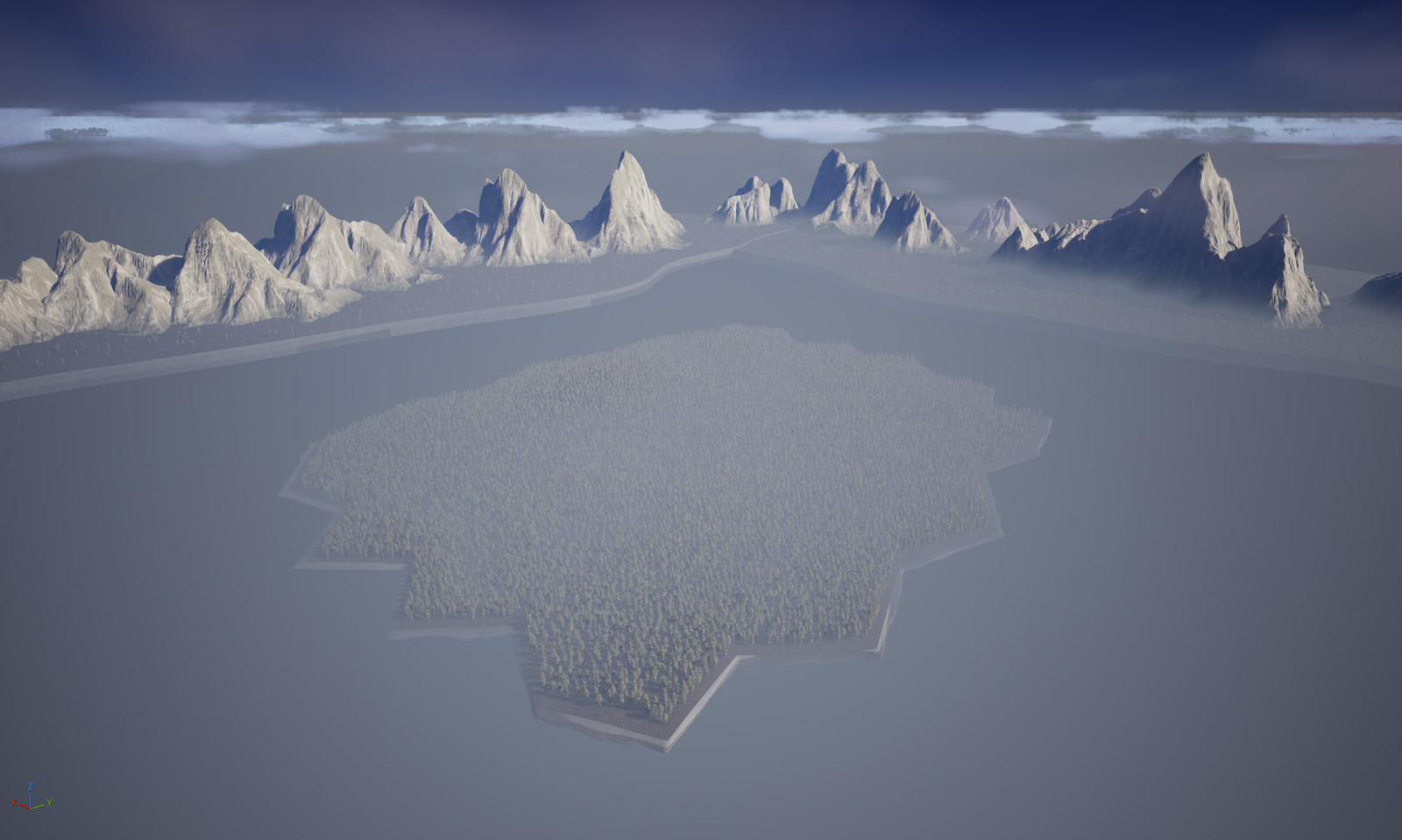
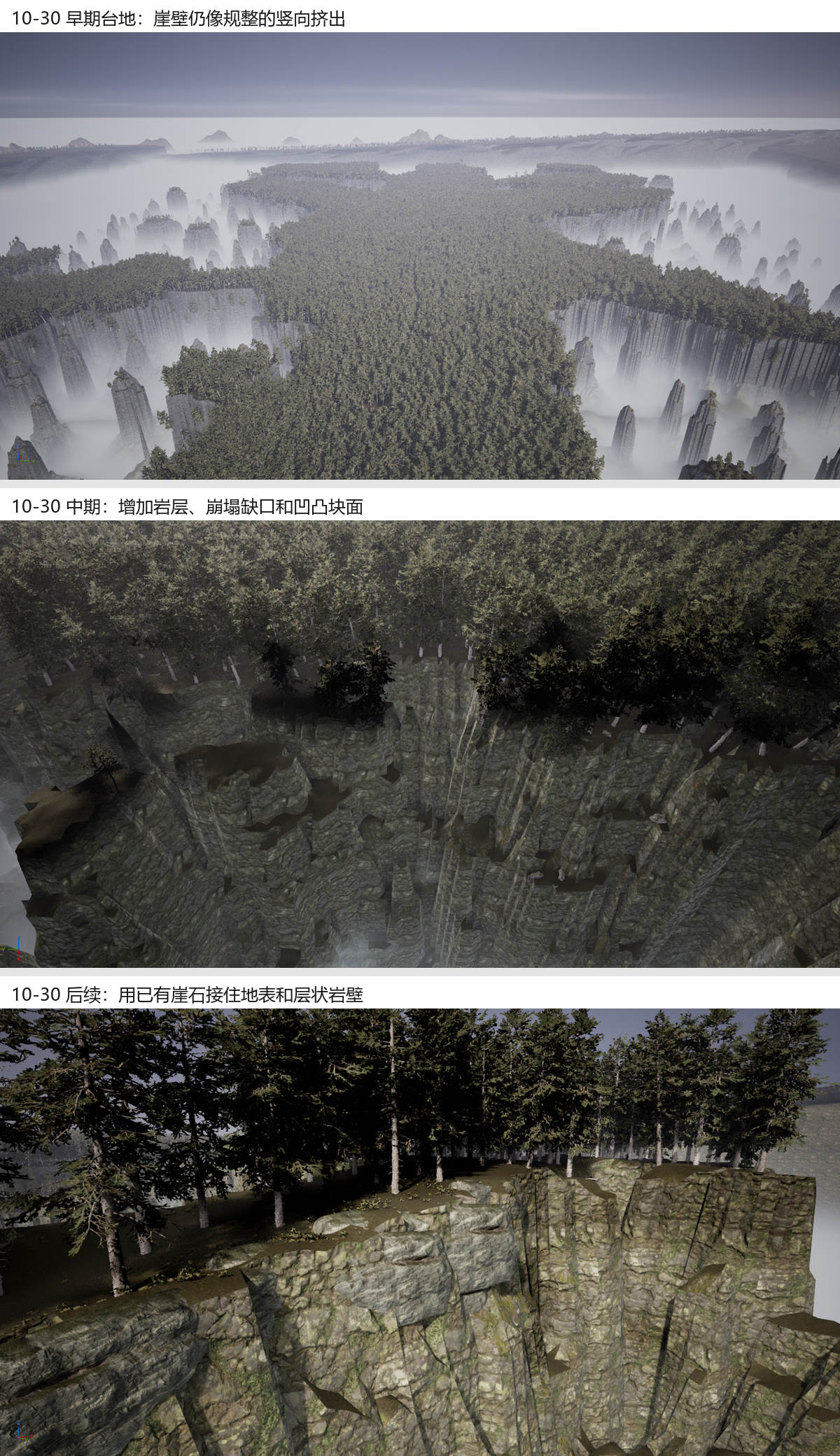
October 30: fault plateaus. Following the concept art, the terrain became fault plateaus cut apart by fog valleys: a contour map to confirm first, then generation. The terrain mesh is about 1.56 million triangles, the main road 3.8 km. Then came a full day of cliffs: horizontal rock strata, collapse notches, rim boulders, and 1400 clouds of volumetric fog in the valleys. In the evening the trees became a layered forest, at its peak about 50,000 trees, with the oldest firs standing 100 to 127 m tall.
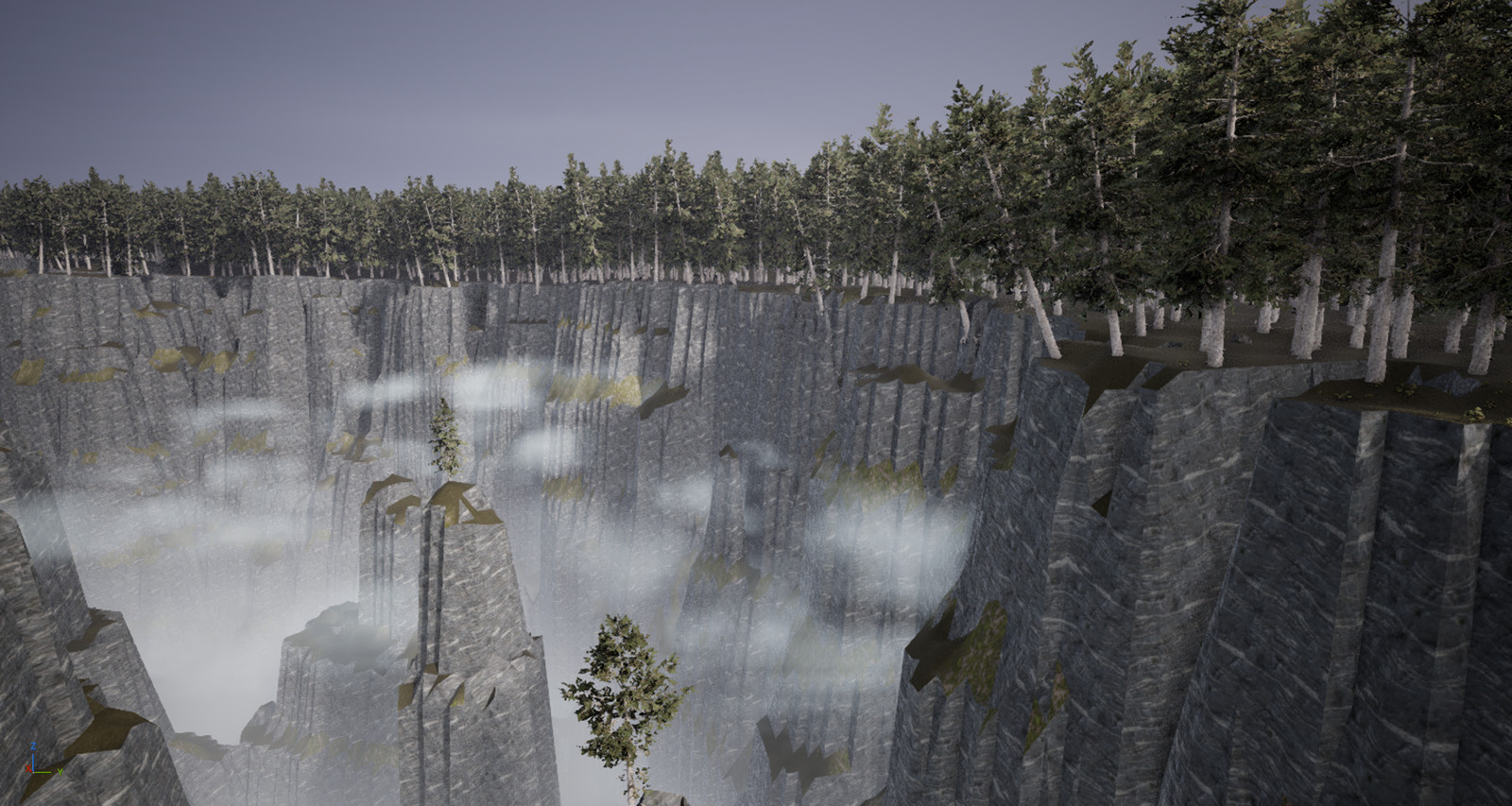
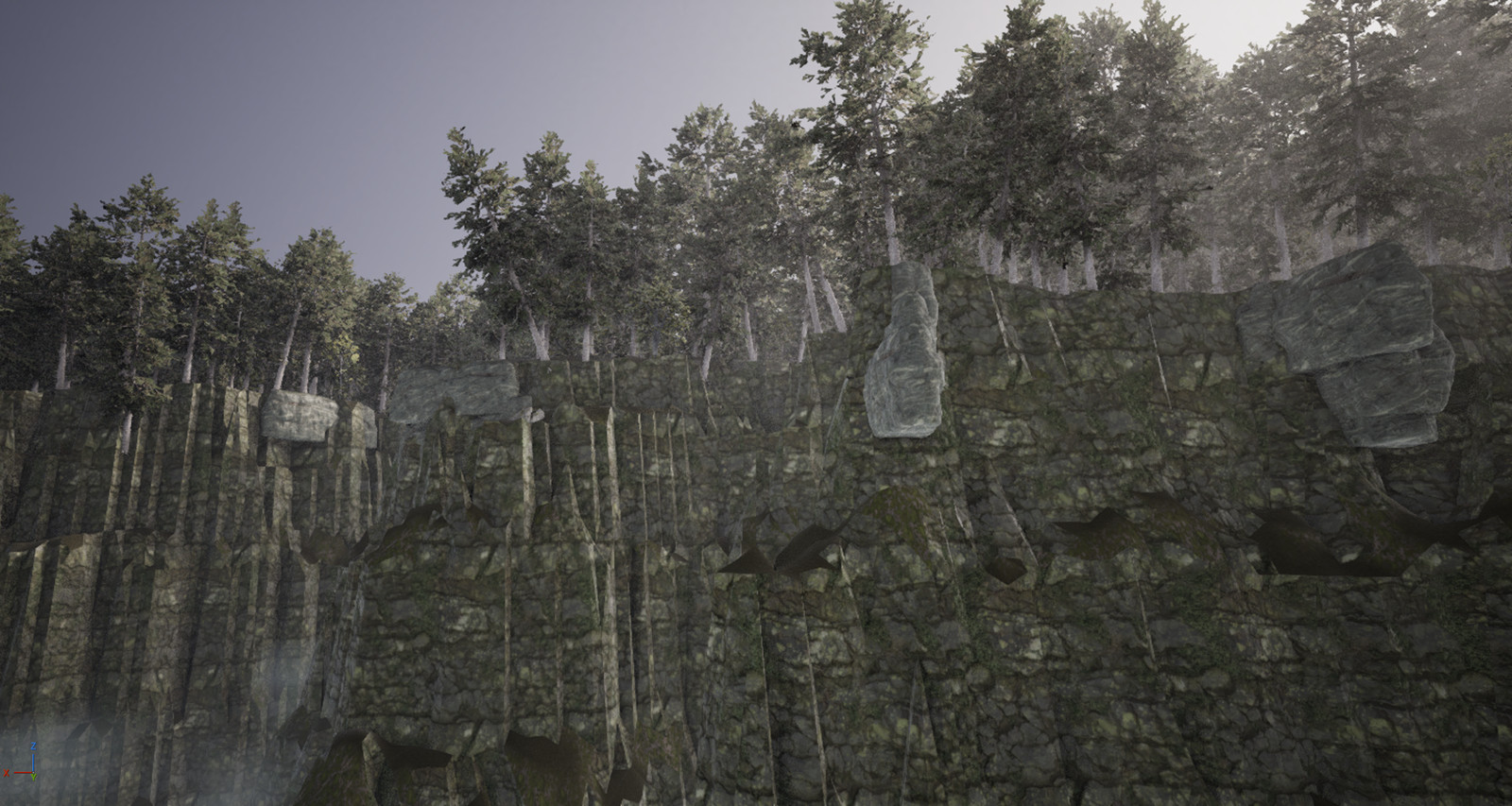
October 31: borders and rules. Tree roots stopped sticking out past the cliffs, and the cliff line got small chips. Pressing F3 in the game now shows coordinates, so a screenshot can report its position directly. We added border walls and the rule that "the deep mist kills".
November 1: filling holes and three art reviews. We added a loading screen for map changes, filled more than two thousand shafts in the map, and then the art director reviewed it three times in a row before signing it off.
The problems we hit, and how we solved them
1. What AI makes is too "regular"
The first cliffs dropped straight from plateau to valley floor within a single grid cell. All you could see were vertical ridges, like a sliced cake. The fix was to recompute the 160 m beyond the cliff top: alternating hard and soft rock strata, ledges and gullies, about a fifth of the cliff edge collapsing in whole sections into notches, and talus cones piled at the foot.
The first notches had a side effect: one collapsed the narrow plateau leading to a monster lair and cut it off. After that, notches were only allowed on plateaus wide enough on both sides, and terrain generation first checks offline that every point of interest can be reached on foot from the camp.
What to put along the cliff edge also took some wrong turns. First we tried scaling the pack's big rocks up three or four times and sticking them along the cliff, which came out pale and round, like a row of bumps. Then we tried the layered cliff blocks already in the project, whose textures went blurry when scaled up. In the end the terrain itself cuts 10 to 25 m rock blocks along joints, with vertical cracks between them. Big rocks are used only as the facing on the very edge of the cliff top, buried in the soil, with gentle slopes and plants covering their bases.
2. The ground you see is not the ground you walk on
We hit this on day one: characters' legs sank into the ground, while fences and characters floated in the air. The cause was that the terrain used Nanite, and the collision was generated from Nanite's automatically simplified mesh, which differed from the visible surface by roughly ten to over a hundred centimeters. Once the simplified mesh was set to keep all its triangles, the error across 300 random points came back within ±9 cm; later terrain has stayed within ±0.1 cm on every rebuild.
There were others like it. Trees scattered by PCG had "default collision" switched on, yet came out with "no collision", so you could walk straight through them, until BlockAll was set explicitly. A tree stump scaled up 6 times had only a single capsule of collision. The big tents had no simple collision at all. All problems of this kind now belong to step 3, the scale sheet: a script measures everything and lists the issues, rather than waiting for a playtest to run into them.
3. More than two thousand shafts in the map
Playtesting turned this up: far from the map edge, there were square pits in the forest with vertical walls and no visible bottom.
At first we suspected holes in the mesh. It turned out the mesh had no open edge anywhere except the outer frame; the problem was in the heightfield itself. The cliff algorithm is nearly vertical, so any valley one or two cells wide makes the surrounding cliffs plunge tens of meters or even over a hundred, which on the mesh is a square well about 8 m wide. An offline count across the map found 2069 such narrow slits and closed pits, most of them within 20 m of a cliff edge. By source: the heightfield itself was the largest share (1503), then rim chips at 469 and collapse notches at 97.
There was a sneakier kind too. Rim boulders only raised the plateau ground under them, so the part straddling a pit mouth was hollow underneath: solid from above, but you fell through when you stepped on it.
The fix is a set of rules that judge by width. Slits that cannot fit a 20 m square are raised into plateau. Small bays behind narrow mouths are leveled. Notches that cannot collapse wide enough simply do not collapse. Gaps under and between rocks are sealed. Any deep pits left are filled to shallow hollows no more than 3 m deep that you can walk out of. Cliff bays that open outward and connect to the fog valley outside are normal cliffs and stay.
The acceptance method changed too. Casting editor rays takes about 175 milliseconds per point, which is too slow, so we compare the 1.25 m navigation grid with the terrain cell by cell. Before the fix, 192301 cells were below the ground; after it, 0 cells.
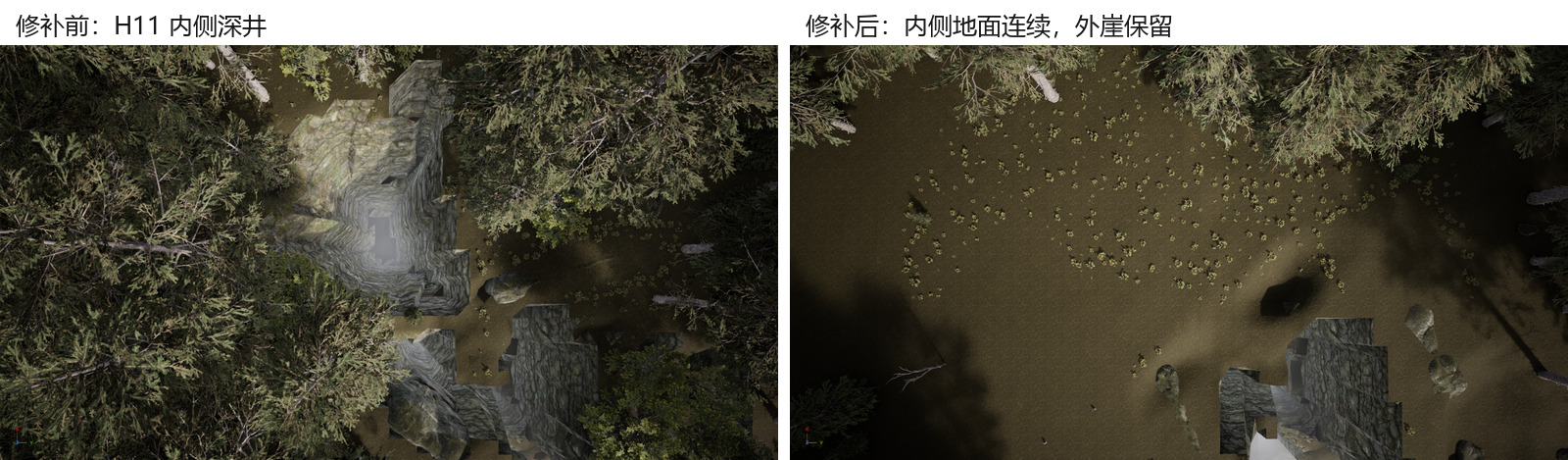
4. Walking off the map and falling forever
During a playtest we walked off the map at the southern border and then just kept falling. The cause: the plateau ran all the way to the map edge before being cut off, and there was nothing beyond it.
The fix has two layers: the outer 250 m of the map is always fog valley, and an invisible wall stands all around it. We also added a game rule: the deep mist kills. Fall into a fog valley and you lose 25% of your health per second, dying in about 4 seconds and reviving at the camp. Your gravestone stays on the last solid ground you stood on before falling, so you do not have to jump into the valley to get your things back. The fog on the valley floor was thickened as well, so looking down from the cliff you see only white, with just the tips of the rock spires showing.
5. Screenshots lie
This is the easiest trap to fall into when AI does visual work.
The fire disappeared. In the screenshots from the art director's first two reviews, the campfire and the cemetery candles showed almost no flames, and a red Lumen cache overflow message often sat in the corner of the image. For a while we thought it was a lighting and cache settings problem. Eventually the programmer found the cause: when the editor is not in the foreground, UE limits it to about 3 frames per second (bThrottleCPUWhenNotForeground). Flame particles do not survive, and Lumen cannot converge in time. The AI drives the editor in the background, so the editor is always "not in the foreground". With that limit turned off and shooting in Simulate mode, the fire came back and the red text went away, without changing the cache size at all.
Three stones in the sky. Screenshots kept showing three stones floating in the sky. They turned out to have been placed in the level temporarily the day before, while trying out rim rocks, and no step in the toolkit was responsible for clearing them. Now the level and environment steps clear such test folders first thing.
Saved, but not saved. With the game client open and having entered this map, the editor's "Save" reports no error, yet the file is never written to disk. The toolkit now checks the file's modification time after every save and raises an error if it has not changed.
6. Freezing on map change
Walking into Northwood from another map froze the picture for several seconds. We changed it to load the new level into memory in the background while the game keeps drawing a loading screen (place name, safety level, progress bar and percentage, with the map's concept art as background), switching over when loading finishes. Northwood's background load takes about 5 to 7 seconds, and the real freeze is down to about 1 second, during which a separate thread draws the same screen. We stepped on one crash along the way: if the preloaded world is registered as a "game world", the engine's world leak check stops it dead at switchover.
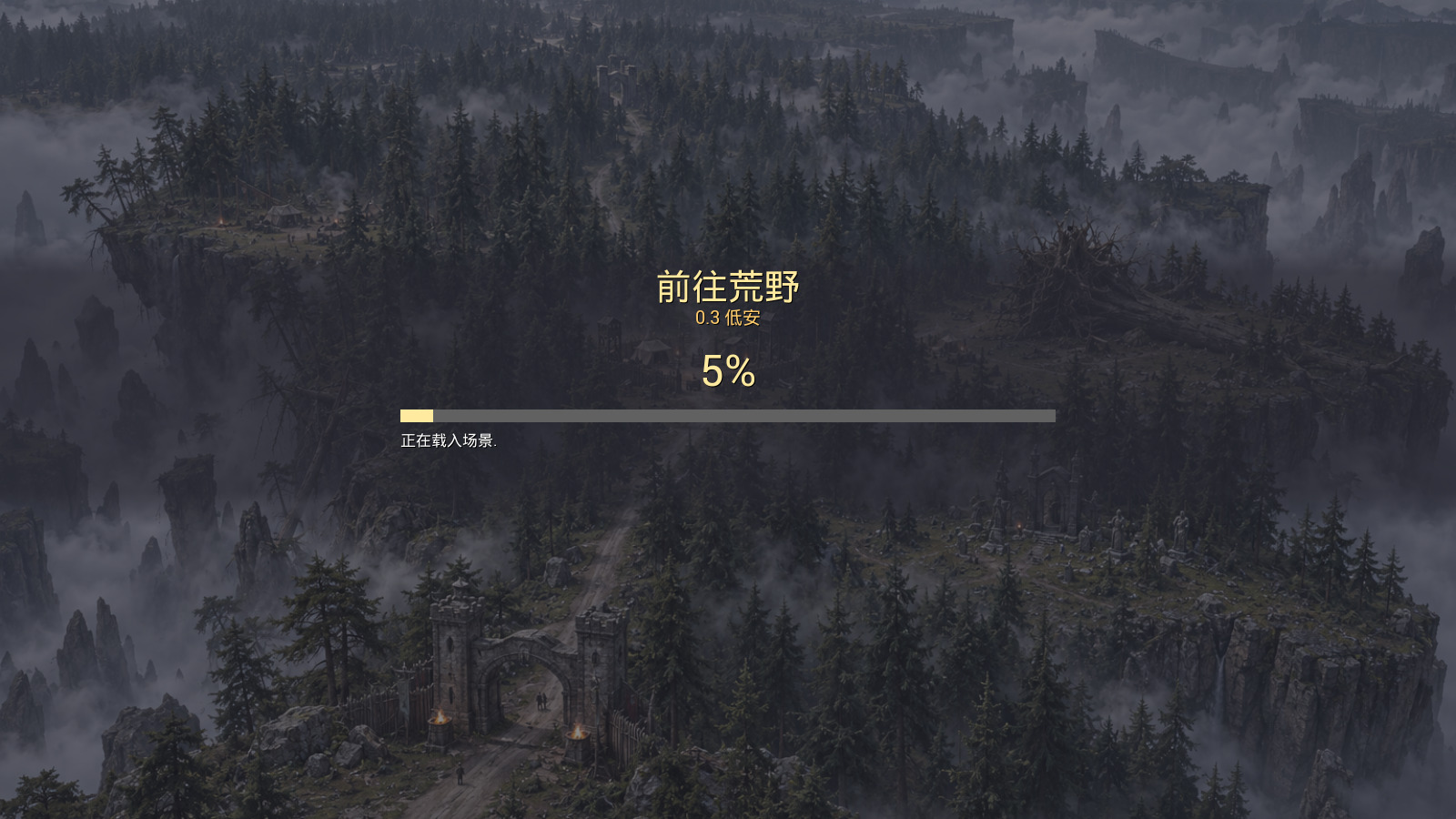
7. AI on a shared computer has to follow rules too
The AI and people use the same computer, and what the AI does can interrupt someone who is using it. The solution is a few hard rules:
- No simulated keyboard or mouse input. Someone may be using another window, and simulated keystrokes would land there. Results are always checked with editor viewport screenshots.
- Ask a person before closing the game or restarting the server.
8. Asset licensing: NoAI
Most of the models in the scene are assets bought on Fab, and many of them carry a NoAI mark. Our understanding (project decision D057) is this: they can go into the game, and AI can look at screenshots containing them to check its work, but neither asset images nor game screenshots may be fed to any image generation model, or used for training. That is why concept art is generated from text only, and we cannot "redo this game screenshot".
There is also an art rule: light comes only from real sources: campfires, braziers, lanterns, candles and skylight. The floating island on day one had purple lights, blue lights and glowing fog appearing out of nowhere, which looked fake, so all of it was removed. Every small warm light added to the cemetery later has a real candle under it.
Having AI review AI: three art reviews
With the holes filled and all traversal checks passing, the picture was still far from the concept art. We handed this stage to the art director: it goes into the editor, shoots from the concept art's camera positions, compares item by item, and writes a review report, with each item giving the location, the current state, what it should become, and how it will be accepted.
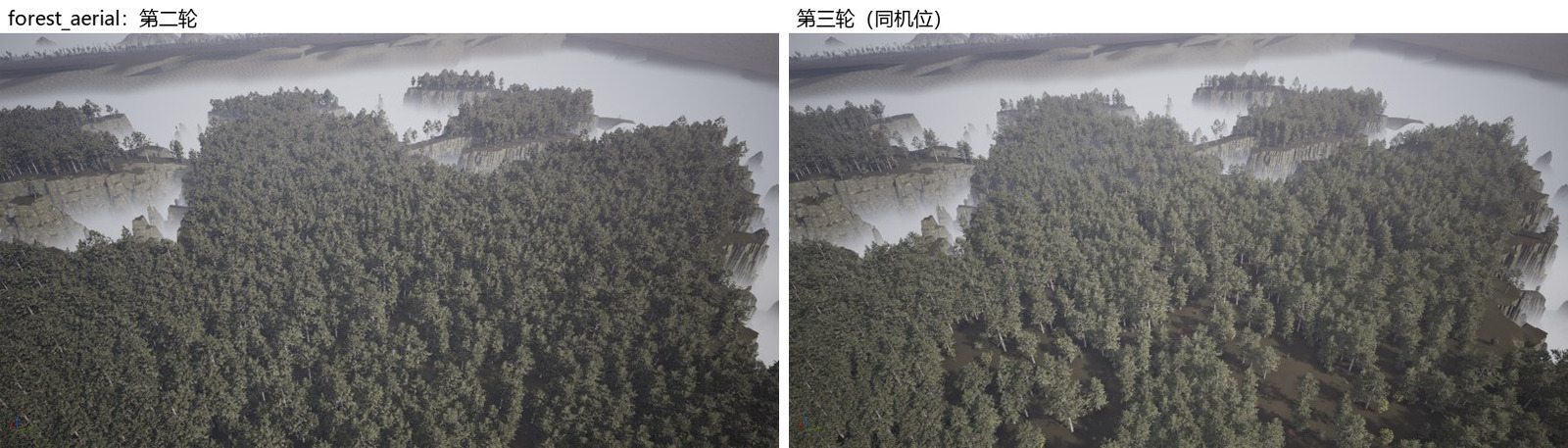
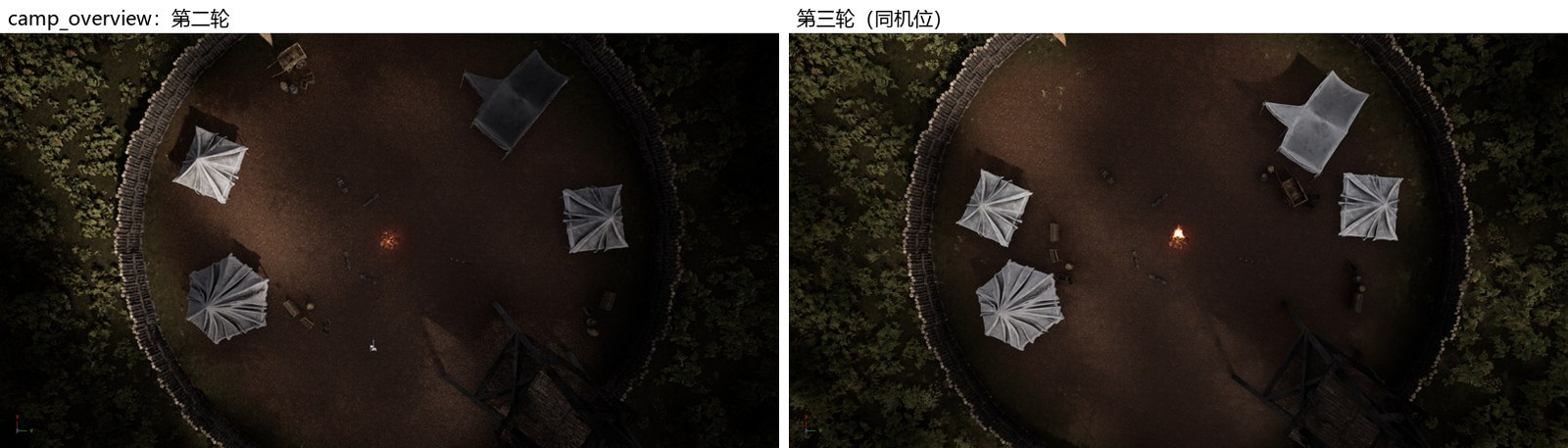
The first round pointed out that the camp's four tents stood evenly around the fence like a display stand, the cemetery had no focal point, and the forest seen from the air was a carpet of trees of uniform thickness. The programmer made a pass of changes.
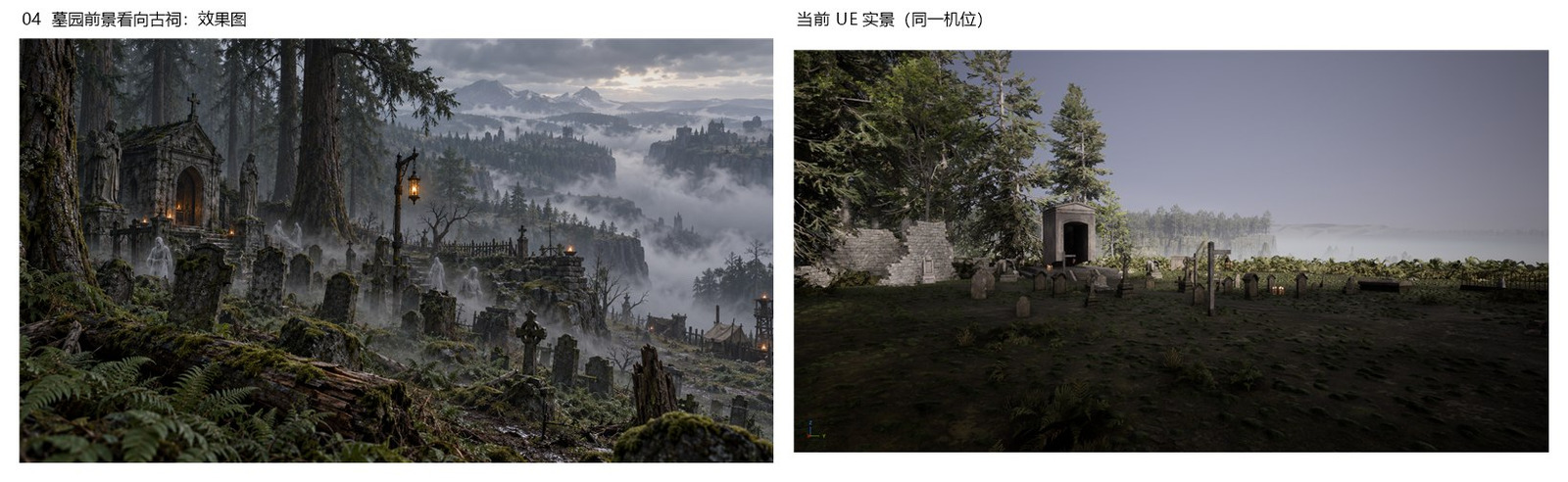
The second round passed the hole filling, forest edge, camp gate and firelight, but the cemetery had turned into bare mud, emptier than before, and the canopy was still one continuous sheet. The rework list was specific: moss in the cemetery must cover 55% to 65% of the ground, with no more than 25% bare soil; the main shrine changes to the arched walls and pitched roof from the same asset pack, two models whose seam height is 254.06 in both, so they line up; the canopy acceptance rate in open woodland drops from 0.45 to 0.12 to 0.18; and clearings are to be left by crown edge, not by trunk position.
The third round signed it off: in 100 × 100 m windows, the median canopy cover is 91% in dense forest and 42% in open woodland; the camp reads as two groups of tents; and the cemetery has an old shrine with an arch and pitched roof, steps, ruined walls, moss and candles. The art director also noticed that the distant camera used so far to judge the cemetery's composition had shrunk the shrine and enlarged the empty sky. At a normal eye height of 1.7 m, the shrine, gravestones, distant cliffs and fog valley fit in one frame, so we did not move the whole cemetery for the sake of composition.
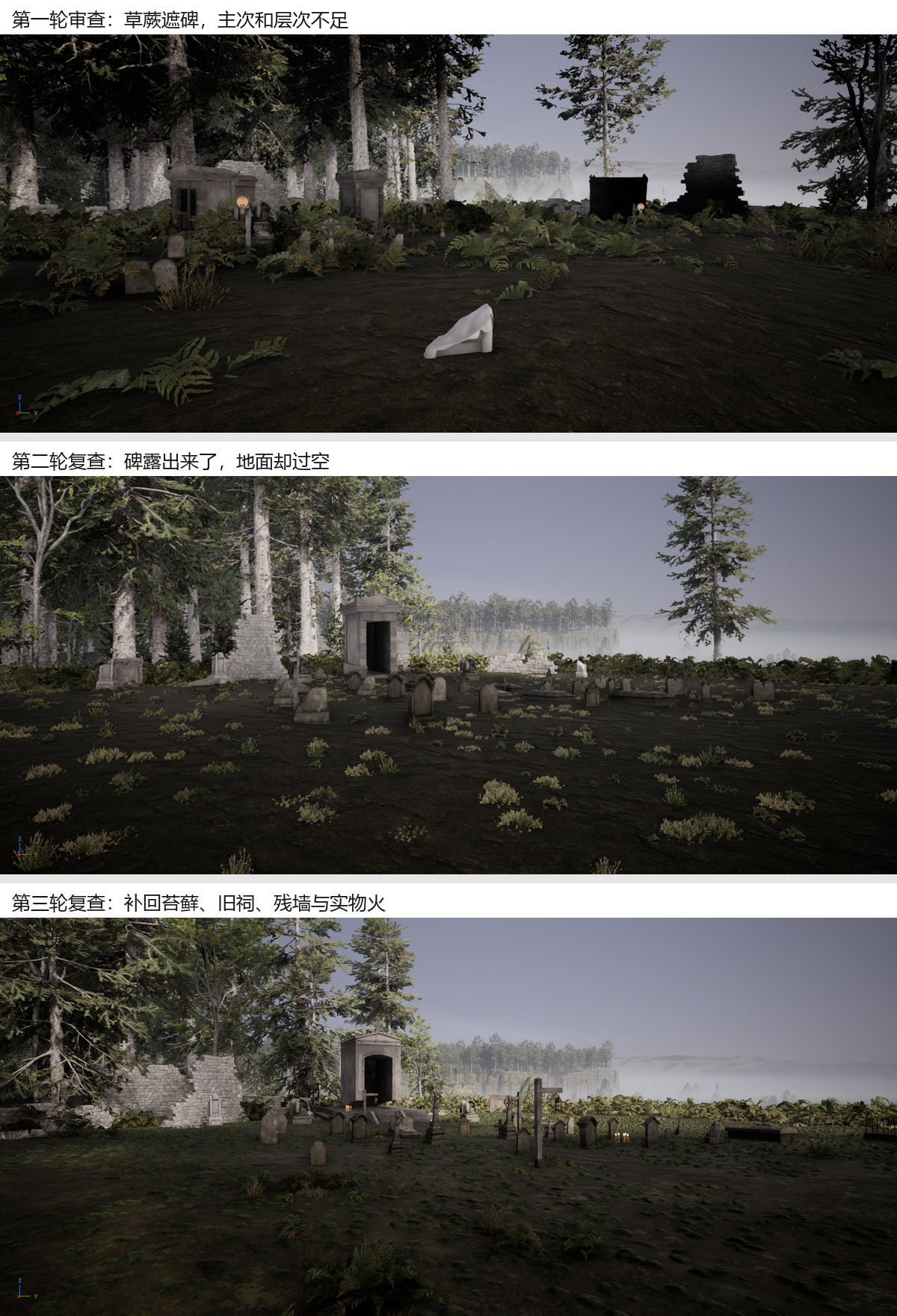
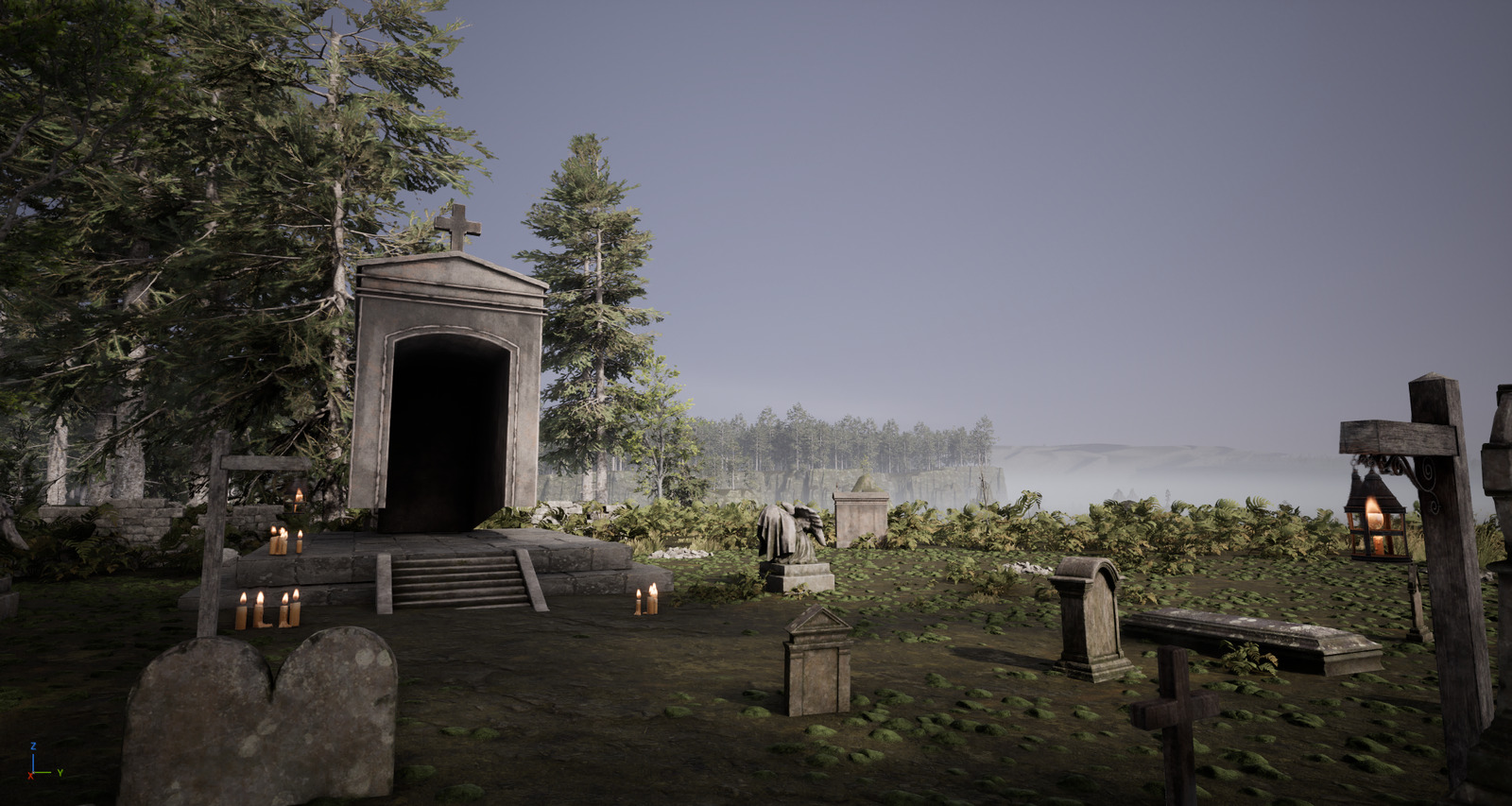
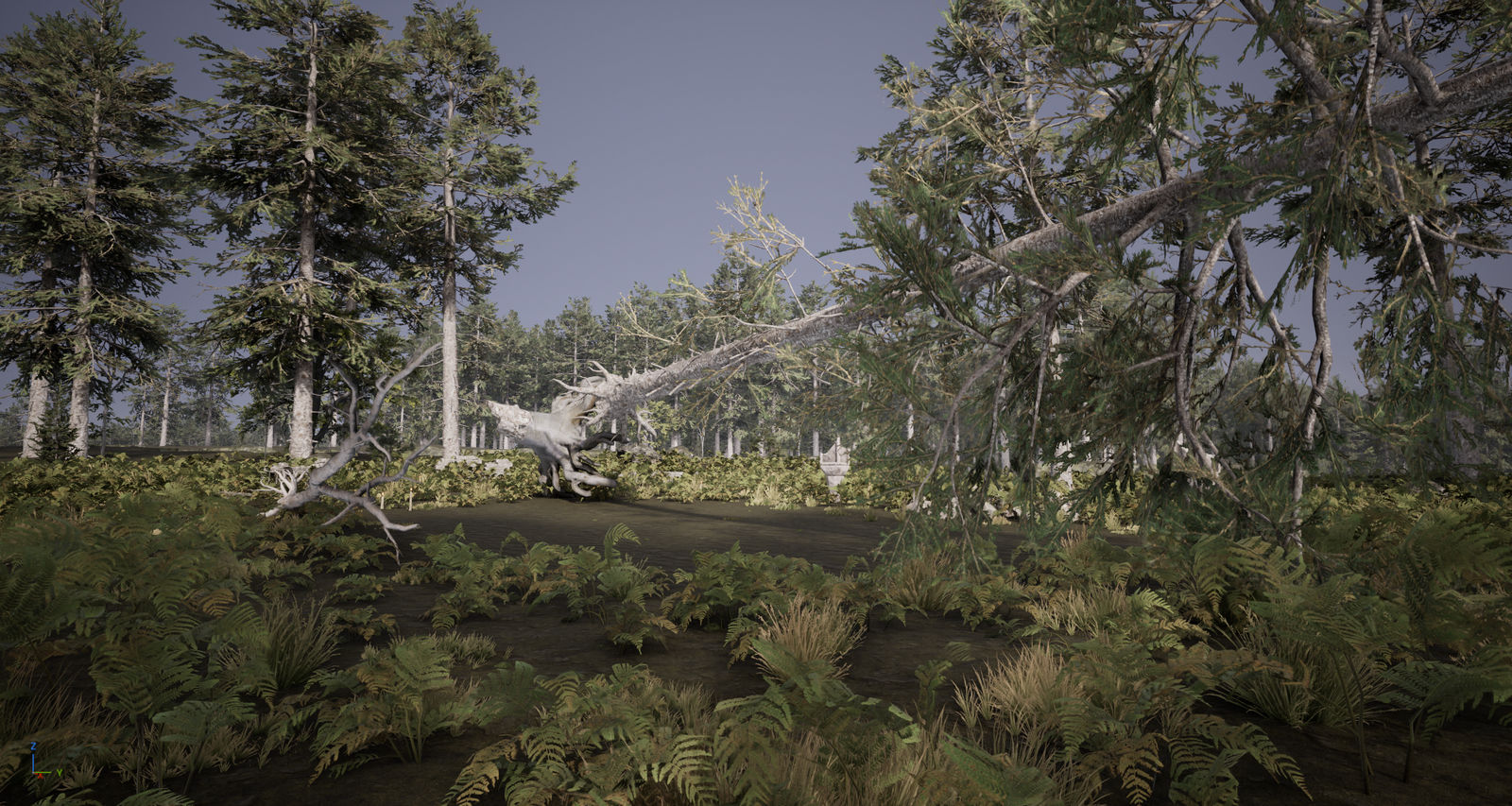
The Sacred Tree followed the same thinking. The fallen giant was hidden by nearby branches and could not be read. Rather than having the programmer keep scaling the model up, the art director had a sight window cleared along the viewing direction, so the eye can follow the root plate, fallen trunk and offerings in turn.
What is not finished is in the report too: local outlines of the outer cliffs, the fog valley below the cliff that cannot be seen at eye height from the logging camp, and the cemetery's plateau being flatter than in the concept art. The concept art is the target, not a state already reached.
A few takeaways
- Let AI change files, not the scene. When everything is generated from the layout and toolkit, problems can be rolled back, rebuilt and regression-tested. Anything an AI drags by hand in the editor is gone on the next rebuild, and nobody knows what it moved.
- Every step has to be automatically checkable. "Looks fine" places no constraint on an AI. Numbers such as ground error, reachability, hole scan cells and canopy cover are the targets it will actually align to.
- Compare screenshots with the concept art, and distrust the screenshots too. For the same scene, whether the editor is in the foreground and whether the camera is a little higher or lower can lead to opposite conclusions.
- Write the rules down. No simulated keystrokes, light only from fire sources, no assets fed to models: with these in the skill and in memory, a freshly started agent knows them from the outset.
Some numbers
| Item | Number |
|---|---|
| First project commit | 2026-10-28 02:37 |
| Commits by November 1 | 117 |
| Map toolkit | 40 files, about 17,000 lines (general purpose, not just for Northwood) |
| Northwood size | About 5 × 4 km, main road 3.8 km |
| Shafts filled | 2069; hole scan leak cells 192301 → 0 |
| Trees | About 50,000 at peak, 18519 in the main forest after density work |
| Art reviews | 3 rounds |
Next
- Finish the logging camp's sight window and the outer cliff outlines.
- Use the same process for the next map: the Borderlands.
- Run a full performance test in the packaged client.
This post was compiled and written by AI from the project's commit history, design documents and review reports. Screenshots come from the editor and the game during development.